If you are a student or fresher, your LinkedIn profile does not need to look perfect. It needs to look complete, clear, and believable. LinkedIn’s own student guidance says even learners with little professional experience can stand out by adding a photo, highlighting education, showing skills, using the summary section, and posting updates. LinkedIn’s profile best-practice guidance also recommends going beyond a plain job title in your headline, listing relevant skills, sharing projects or certifications, and keeping your “About” section story-driven rather than empty or generic.
This guide explains how to create a strong LinkedIn profile for students and freshers in 2026 using simple steps, real examples, and a style that looks professional without feeling fake. It is written for readers who want a profile that helps with internships, part-time jobs, campus placements, freelancing, and future full-time work.
Why strong LinkedIn profile for students and freshers
A strong LinkedIn profile matters because recruiters, hiring managers, and companies use the platform to find candidates and check whether a person looks active, credible, and career-ready. LinkedIn’s help page says your profile is designed to help you create opportunities, get noticed, and connect with recruiters and jobs. That is especially useful when you do not yet have a long work history, because your profile becomes the place where your education, projects, interests, and skills can speak for you.
For latestnewss.com, this article also fits the current site structure well. The site’s Education & Jobs pages are already being used for practical career content, and the homepage shows related posts such as resume writing, cover letters, and high-income skills. That means this LinkedIn guide strengthens the same job-ready content path rather than creating a random topic jump.
Step 1: Use a professional photo
Your profile photo is one of the first things people notice. LinkedIn’s student guidance says a photo gives your profile legitimacy and helps people recognize you, while its profile best-practice article recommends using a recent picture that looks like you, has good framing, and presents you in a professional way. You do not need a studio shoot, but you do need a clean, clear, face-forward image that looks appropriate for work or internships.
A simple real-world example: if a student applies for an internship using a friendly, well-lit photo with a plain background, the profile usually feels more trustworthy than one with a cropped group photo, heavy filters, or a blurry selfie. The goal is not to look overly formal. The goal is to look dependable and easy to identify. LinkedIn’s own guidance supports that approach.
Step 2: Write a headline that says more than your job title
Your headline should not be only “Student” or “Fresher.” LinkedIn’s 2025 profile guidance says the headline field does not need to be just a job title; it can explain how you see your role, what you care about, and what makes you different. For students and freshers, this is one of the quickest ways to make the profile feel stronger.
Good headline examples include:
“B.Com Student | Excel, Accounting, and Business Analysis Enthusiast”
“Computer Science Fresher | Learning Python, Web Development, and Problem Solving”
“Marketing Student | Content Writing, Social Media, and Digital Strategy”
These headlines work because they are specific, useful, and easy to read. They tell a recruiter what kind of person you are becoming, not just what stage you are at.
Step 3: Use the About section like a short personal story
LinkedIn’s profile guidance says the About section should tell your story instead of acting like a boring list of job titles or courses. The 2025 best-practice article also says this section should explain why your skills matter and what kind of difference you want to make. For students and freshers, that means describing your interests, strengths, goals, and the kind of opportunity you are looking for.
A strong About section could start like this:
“I am a final-year commerce student interested in finance, business reporting, and data analysis. Over the last two years, I have worked on academic projects, presentations, and Excel-based tasks that helped me build analytical and communication skills. I am now looking for internship and entry-level opportunities where I can learn, contribute, and grow.”
That version works because it sounds human, not inflated. It also gives a recruiter something real to remember.
Step 4: Highlight education the right way
For students and freshers, education is not background noise. It is one of the most important parts of the profile. LinkedIn’s student guidance says you should add your school or college, major, courses, scores, organizations, honors, and awards where relevant. If you do not have much work experience yet, that is fine. Your education and coursework can still show skills, direction, and seriousness.
A strong education section should include:
College or university name
Degree and stream
Year of study or graduation
Relevant coursework
Achievements or awards
Clubs, leadership roles, or academic activities
For example, a student in a business program might include financial accounting, business communication, Excel, and a class presentation project. That is better than simply listing the degree and stopping there.
Step 5: Add experience even if you are a fresher
Many freshers think they have “no experience,” but LinkedIn’s student advice shows that part-time jobs, internships, summer jobs, and volunteer work all count. You can also include writing samples, design work, research work, or any project that shows what you can do. The point is to demonstrate real effort and skills, even if the work was short-term or unpaid.
Examples of experience worth adding:
Internship tasks
College event organization
Volunteer roles
Freelance writing or design
Part-time customer service
Research or academic project support
If you are applying for a role in content, media, or digital work, this becomes even more important. Our article How to Write a Resume That Gets Interviews works well with this one because a resume shows the proof, while LinkedIn gives the broader picture. Together, they make your career story stronger.
Step 6: List relevant skills, not random skills
LinkedIn’s profile best-practice article says you should list relevant skills and keep them tied to your actual experience. Its student guide also says soft skills like communication, critical thinking, and teamwork matter a lot, even when you are still learning hard skills. This is good news for freshers, because it means you do not need to pretend to know everything. You just need to show what you already do well and what you are actively building.
A better skills section might look like this:
Communication
Teamwork
Excel
Research
Canva
Content writing
Basic Python
Presentation skills
Keep your list focused. If a skill does not match your real background or the type of work you want, leave it out. A short, relevant list often performs better than a huge list that feels scattered.
Step 7: Add projects, certifications, and proof of work
LinkedIn’s 2025 profile guidance recommends showcasing projects, certifications, and publications because they help people see what you can actually do. For students and freshers, this is one of the smartest ways to make a profile stand out without inventing experience.
If you completed a college project, made a website, designed a poster, wrote an article, analyzed data in Excel, or built a small app, add it. If you completed a course certificate, add that too. Projects and certifications give your profile more credibility because they show action, not just intention.
If you want to build more marketable skills after setting up your profile, Top 10 High-Income Skills to Learn Online in 2026 is a useful next read. It fits the same Education & Jobs cluster and helps students think beyond credentials toward practical, job-ready ability.
Step 8: Make the profile active, not silent
LinkedIn’s student guidance says posting updates and engaging with others matters because it keeps your profile active and helps you stay visible. The 2025 profile best-practice article also recommends sharing relevant content and following people or topics in your field so your feed and profile reflect your interests.
That does not mean you need to post every day. It means you should not let the profile sit untouched. A student can stay active by:
Sharing a course project update
Posting an internship reflection
Commenting thoughtfully on industry posts
Sharing a certificate or achievement
Writing a short post about what they learned from a workshop
This makes the profile feel current and genuine. Recruiters notice that.
Step 9: Add recommendations and certifications when you can
LinkedIn’s best-practice guidance says recommendations help illustrate how others have experienced working with you, and certifications help show your knowledge and professional growth. For students, even one recommendation from a professor, mentor, internship supervisor, or project lead can make the profile feel more credible.
Certifications also matter because they show initiative. If you completed an Excel course, a digital marketing class, a communication workshop, or a software training module, add it clearly. This is especially useful when you are trying to move from student life into internships or entry-level roles.
Step 10: Connect your LinkedIn profile to the rest of your job search
Your LinkedIn profile should not live alone. It should connect to your resume, cover letter, and overall job strategy. That is why the articles How to Write a Resume That Gets Interviews and How to Write a Winning Cover Letter in 2026 make such a good companion set. Resume, cover letter, and LinkedIn profile should tell the same story in slightly different formats.
If your first internship or part-time job starts bringing in income, How to Manage Your Salary Better in 2026 is also useful because career growth and money planning usually happen together. If you are still building your base, How to Create a Monthly Budget That Actually Works in 2026 can help you manage that income with less stress.
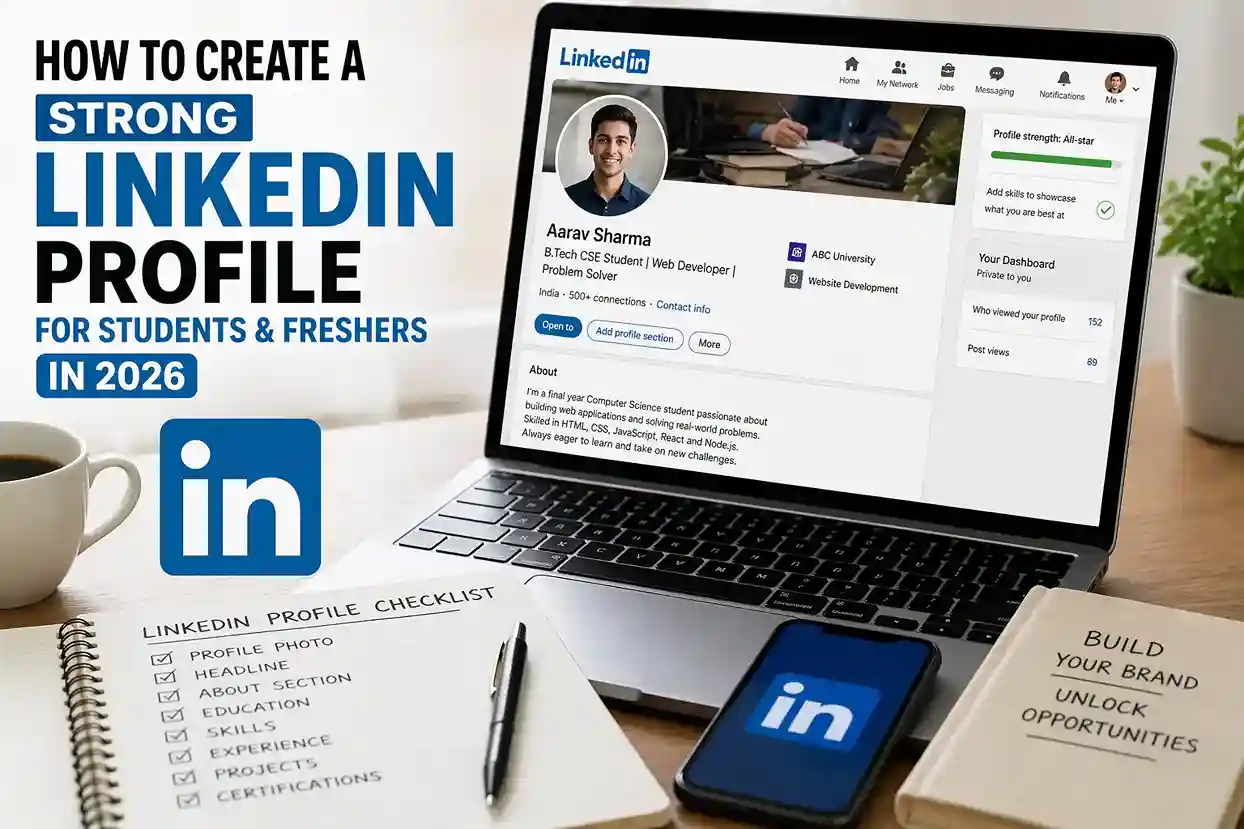
A simple LinkedIn profile blueprint for students and freshers
A strong profile can follow this easy structure:
Professional photo
Headline with more than your job title
About section with story and goals
Education with coursework and achievements
Experience with internships or projects
Skills with relevant strengths
Certifications and recommendations
Recent activity or posts
This structure works because it is clear, complete, and easy for recruiters to scan. LinkedIn’s own help and student guidance point in the same direction: make the profile complete, representative, and active enough to create opportunities.
Common mistakes to avoid
A weak LinkedIn profile usually has one or more of these problems:
No photo
Only “student” in the headline
An empty About section
No project or internship details
Too many random skills
No recent activity
A profile copy-pasted from someone else
These mistakes are easy to fix. The more your profile looks like a real person with direction, the better it performs. For freshers, clarity is more powerful than trying to sound impressive.
Frequently Asked Questions
1. What should students put in their LinkedIn headline?
Students should use a headline that shows their degree, interest area, and a few relevant strengths instead of only writing “student” or “fresher.” LinkedIn says the headline can be more than a job title.
2. Do freshers need a profile photo?
Yes. LinkedIn’s student guidance says a photo helps with recognition and gives the profile legitimacy.
3. What if I have no internship experience?
Use projects, volunteer work, part-time work, coursework, certificates, and other real examples. LinkedIn says students can include part-time jobs, summer jobs, internships, volunteer work, writing samples, and design work.
4. Should I post on LinkedIn as a student?
Yes. LinkedIn recommends posting updates and engaging with content because it helps keep the profile active and visible.
5. How long should the About section be?
It should be short enough to read quickly but long enough to explain who you are, what you are learning, and what kind of opportunity you want. LinkedIn’s guidance recommends telling your story rather than listing everything.
6. What skills should I add if I am a fresher?
Add only relevant skills such as communication, teamwork, Excel, content writing, research, Canva, Python, or other abilities that match your target role. LinkedIn recommends staying relevant rather than listing everything.
7. What should I do after optimizing my profile?
Pair it with a strong resume and cover letter, and keep building practical skills through focused learning. Our internal guides on resume writing, cover letters, and high-income skills are a good next step.
Final thoughts
How to create a strong LinkedIn profile for students and freshers in 2026 comes down to one simple idea: make your profile look complete, specific, and active. A clear photo, a useful headline, a story-driven About section, real education details, relevant skills, projects, and a little activity can make a big difference. LinkedIn’s own help resources all point toward the same outcome: a profile should function like a professional landing page that helps you get noticed and create opportunities.

Shiva S writes about AI, cybersecurity, online safety, Google Discover, and digital trends. His focus is creating practical, easy-to-understand guides that help readers stay informed and safer online.