Job scams are one of the easiest ways criminals target people who are actively trying to improve their lives. A fake recruiter can look professional, sound encouraging, and use the language of a real hiring team. The message may mention a dream salary, a remote role, a quick interview, or an urgent hiring deadline. That is exactly why job scams work: they meet people at a moment when hope and pressure are both high.
The FTC has warned that fake job offers and fake recruiter texts are a real scam pattern, while CISA advises people to recognize suspicious messages and verify requests through trusted channels. The same caution applies to LinkedIn, WhatsApp, email, and text messages. FTC guide on recognizing and reporting spam text messages, CISA recognize and report phishing.
This guide shows you how to spot job scams and fake recruiter messages in 2026, what warning signs matter most, and what to do when a message does not feel right. It is written for beginners, but it is practical enough for anyone who uses online job platforms regularly.
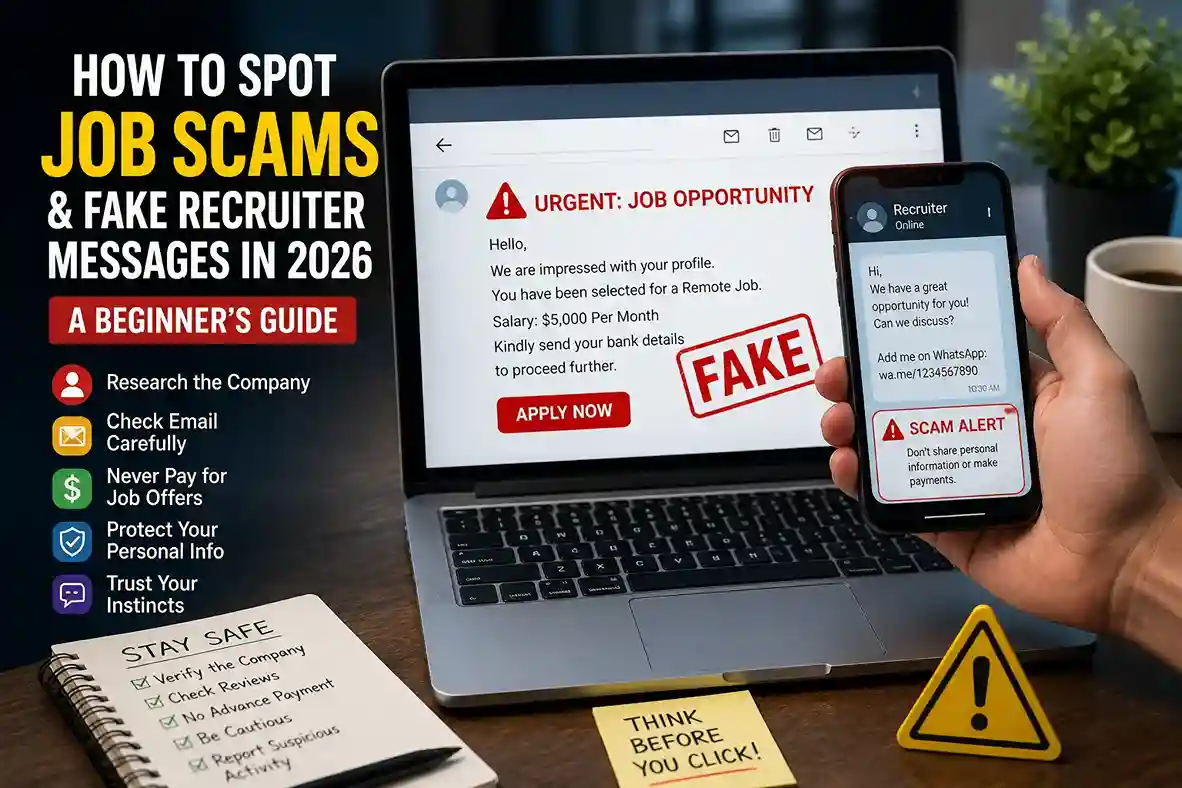
Quick answer: Check the sender, verify the company through official channels, avoid paying upfront, never share sensitive IDs early, and be suspicious of urgent offers that skip normal hiring steps.
Why spot job scams and fake recruiter messages are so effective
Job scams succeed because they imitate the normal excitement of the hiring process. A message may promise fast hiring, a flexible work-from-home schedule, or high pay for very little effort. Some scammers even copy real company branding, use real employee names, or steal language from genuine job listings.
The emotional trick is simple: they want you to respond before you verify. If a message says there are only two spots left, that the recruiter is in a hurry, or that you must act before the offer expires, slow down. Legitimate hiring may be fast, but it should still feel organized and traceable.
This is the same trust-vs-verification problem that appears in other online safety topics on latestnewss.com, including How to Spot Phishing Emails and Scam Links in 2026: A Simple Beginner’s Guide and How to Keep Your Personal Data Safe Online in 2026: A Beginner-Friendly Guide. When people are rushed, they are easier to manipulate.
A beginner-friendly checklist to spot fake recruiter messages
1. The recruiter contacts you out of nowhere
An unexpected message is not always fake, but it should raise your caution. If the recruiter found you through a platform, check whether the profile looks real, complete, and connected to a genuine company presence. A polished message alone is not proof.
2. The salary sounds too good for the role
Scammers often lead with unusually high pay because that is what gets attention. If the pay is far above market rate and the requirements are unusually low, treat the offer as suspicious until you verify the employer carefully.
3. The recruiter wants personal details too early
A real employer may eventually need identification and tax information, but not at the first message. Be careful if someone asks for Aadhaar, passport, bank details, login credentials, or OTPs before there is a verified job offer or formal onboarding.
4. The message pushes you to switch platforms quickly
Scammers often try to move the conversation from a trusted job site to WhatsApp, Telegram, SMS, or personal email. That shift can make it harder to trace the sender and easier for them to disappear if questioned.
5. The company name exists, but the email domain looks wrong
A real company should use a matching professional domain. If the message claims to be from a major brand but comes from a free email account or a misspelled domain, verify it through the official careers page before continuing.
6. They ask for money, training fees, or equipment costs upfront
This is one of the biggest red flags. Legitimate employers should not make you pay to get hired. Some scams disguise these requests as registration fees, equipment deposits, background checks, or refundable setup costs.
7. The interview process skips normal steps
If you are told that the job is basically yours without an interview, assignment, or basic screening, be cautious. Real hiring can be friendly and fast, but it usually still involves verifiable steps and a known contact path.
Real-world examples readers may see in 2026
Example 1: A WhatsApp message says a recruiter found your resume and offers a remote assistant role with a very high salary. The recruiter asks you to confirm your identity with a photo ID and a one-time code. That combination of urgency, identity request, and OTP demand is a strong scam signal.
Example 2: A LinkedIn message invites you to a hiring round for a known brand, but the sender profile has almost no activity and the company website linked in the message is slightly misspelled. In that case, do not reply through the message thread. Go to the official company career page and compare the offer with listed openings.
Example 3: An email from a supposed HR team says you were selected after a brief application and asks you to pay for onboarding documentation. That request should immediately raise suspicion. Real employers do not usually charge candidates to be hired.
These examples matter because scams are no longer clumsy. The same style of deception appears in broader safety content too, such as How to Protect your Phone From Scam Calls, Fake OTPs, and Online Fraud in 2026, where the lesson is again to pause, verify, and avoid giving away sensitive information too quickly.
How to verify a recruiter before you trust the message
Start by checking the company name through its official website, not through the recruiter’s message. Open the careers page manually and compare the role, salary range, and contact details. If the company has a public HR email or talent team, compare the address to the one in the message.
On LinkedIn, look for profile completeness, work history, mutual connections, and whether the recruiter’s post history matches their claimed role. A recruiter profile with a real company badge, clear employment history, and consistent activity is still not a guarantee, but it is much better than an empty profile with a copied logo.
If the message includes a job post link, inspect the URL before clicking. Strange subdomains, extra words, or unusual spelling can hide a fake page. The same careful link-checking habit also helps when you read our article on How to Spot Phishing Emails and Scam Links in 2026: A Simple Beginner’s Guide.
For especially important decisions, verify through a second source. Search the company’s official website, LinkedIn page, or public contact page and ask whether the recruiter works there. CISA recommends going to the company’s website and using verified contact details when something looks suspicious. CISA phishing recognition guidance.
What you should never do
Do not pay to apply, do not send OTPs, and do not give bank details to a recruiter before the employer is fully verified. Do not install unknown apps or fill out forms that demand unnecessary permissions. Do not ignore your instincts just because the role sounds exciting.
Also avoid using public pressure as your guide. Scammers often say a role is urgent or exclusive so you feel lucky and act quickly. If a message creates more panic than clarity, that is a sign to step back.
A useful habit is to keep your job search separate from your personal accounts and to use strong authentication on the email address connected to applications. If you have not already done that, our guide on How to Set Up Two-Factor Authentication in 2026: The Ultimate Beginner’s Guide to Secure Your Accounts is a practical next step.
What to do if you receive a suspicious recruiter message
Do not continue the conversation. Save screenshots, block the sender, and report the message through the platform where it arrived. If it came by text, the FTC says you can forward scam texts to SPAM (7726) and report phishing attempts at ReportFraud.ftc.gov. FTC reporting guidance.
If it came through LinkedIn or email, use the platform’s report tools and then delete the message once you have preserved the evidence you need. Google also recommends reporting suspicious emails as spam or phishing so future scams can be reduced. Google account security guidance.
If you already shared sensitive information, contact the relevant service provider immediately and review your account activity. That is especially important if you shared an OTP, bank information, or identity document.
How this fits the latestnewss.com content cluster
This topic fits the site’s existing education and jobs content very naturally. Readers who want to learn how to build a safer professional presence can move from this article to How to Create a Strong LinkedIn Profile for Students and Freshers in 2026 and then to How to Write a Winning Cover Letter in 2026: Step-by-Step Guide.
Readers who care about broader digital safety can also continue into How to Keep Your Personal Data Safe Online in 2026: A Beginner-Friendly Guide and How We Verify News Before Publishing: Fact-Checking Process for Readers because the same verification mindset helps everywhere online.
If someone is learning about scams in general, the article How to Stay Safe on Public Wi-Fi in 2026: A Simple Cybersecurity Guide is also a good companion piece since fake recruiters sometimes use unsafe networks, copied login pages, and social engineering together.
Why this article works for AdSense and Google Discover
This article is a strong AdSense fit because it is original, practical, evergreen, and clearly written for readers. It is not thin content or a short repost of a news alert. It gives people a useful skill that can save time, money, and stress. That is the kind of content Google’s Search Essentials encourage: helpful, reliable, people-first material. Google Search Essentials.
For Google Discover, the article works because it addresses a real concern in a clear, mobile-friendly format. Strong headings, short paragraphs, real examples, and FAQ content make it easy to scan. That matters because job seekers often read advice quickly while moving between app notifications, messages, and browser tabs.
Frequently asked questions
How can I tell if a recruiter is fake?
Look for pressure, requests for money or personal details, odd email domains, rushed offers, and profiles that do not match the company they claim to represent.
Is it normal for a recruiter to ask for my ID early?
Usually no. A verified employer may eventually ask for identity documents during onboarding, but not before you have confirmed the company and offer through official channels.
Do real recruiters use WhatsApp or Telegram?
Some legitimate recruiters may use them for convenience, but you should verify the person and company first. The platform alone does not prove the message is genuine.
What should I do if I already replied to a suspicious recruiter?
Stop sharing information, save evidence, block the sender, and report the message. If you shared sensitive data, contact the relevant service or bank immediately.
Should I trust a job offer that says no interview is needed?
Be very careful. Some legitimate roles move quickly, but skipping normal hiring steps can be a scam sign, especially if the role promises easy money or asks for payment.
Why are job scams so common now?
Because people are actively searching, hopeful, and often tired from applying to many roles. Scammers take advantage of that pressure with fake urgency and attractive offers.
Conclusion
Learning how to spot job scams and fake recruiter messages in 2026 is mostly about slowing down and verifying the basics. Check the sender, inspect the domain, verify the company through official sources, and never let urgency replace judgment.

Shiva S writes about AI, cybersecurity, online safety, Google Discover, and digital trends. His focus is creating practical, easy-to-understand guides that help readers stay informed and safer online.