In 2026, the best passwords are not the ones that look complicated on paper. They are the ones that are long, unique, and realistic enough for a human being to remember without writing them on a sticky note. That matters because password reuse is still one of the fastest ways a small problem becomes a bigger one. If someone gets into one account, they may be able to try the same password elsewhere, which is why habits like the ones in How to Strengthen Your Digital Privacy Habits in 2026 and How to Create a Personal Cybersecurity Checklist in 2026 are so useful. Google recommends using a different password for each important account and making it at least 12 characters long, while NIST says memorized secrets should be hard enough to guess that an attacker would find them impractical to discover. The FTC also advises using strong passwords with two-factor authentication because passwords alone can still be stolen.
The good news is that how to create strong passwords people actually remember in 2026 is much easier than many people think. You do not need a random string of nonsense that you immediately forget. Google suggests using memorable material such as a lyric, a quote, a passage, or the first letters of a sentence, and it specifically says strong passwords should be unique and long rather than based on obvious personal details. NIST also advises against common words, repetitive patterns, and compromised values, which means the goal is memorability without predictability.
How to Create Strong Passwords People Actually Remember in 2026
The easiest way to build a memorable password is to start with something that makes sense to you, then transform it into something an attacker would not guess. That can be a sentence, a rhythm, a movie line, a song lyric, or a personal phrase that does not reveal private information. Google’s guidance specifically recommends using a meaningful quote, a passage, a series of words that matter to you, or an abbreviation built from the first letter of each word in a sentence.
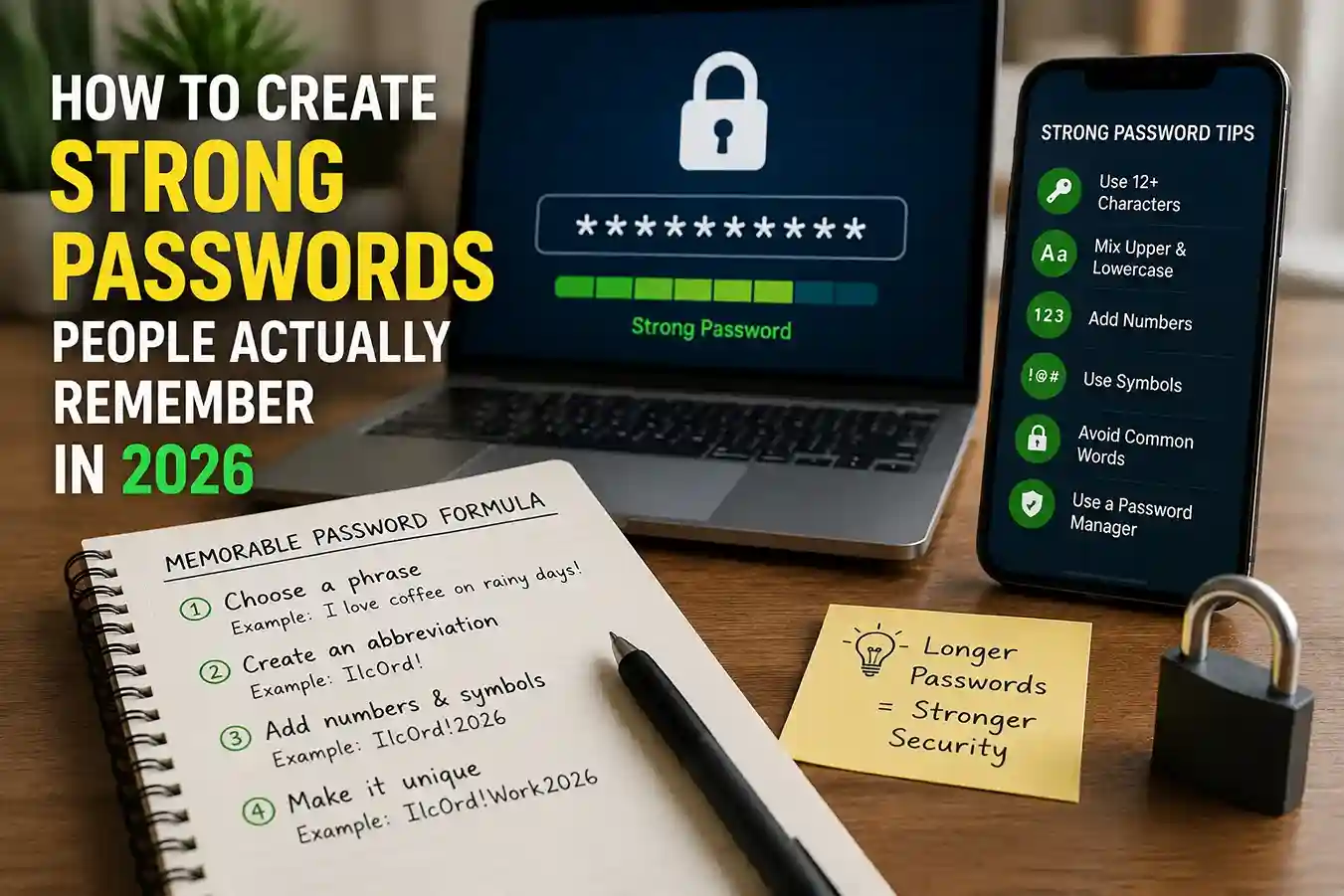
A simple example helps. Instead of trying to remember Xr9!qP2vL, you might start with a sentence you will not forget, such as “I walk the dog before sunrise on Saturdays,” and turn it into a compact password based on the first letters, a few deliberate changes, and a length boost. The result should still feel memorable to you, but not obvious to anyone else. The point is not to create something “clever.” The point is to create something that survives daily use without being reused on another account.
Start with a sentence, not a random jumble
A sentence-based method works because your brain remembers meaning better than randomness. You can take a phrase, then compress it. For example, a sentence like “Three coffees, one notebook, and a quiet morning” can become a password structure that keeps the rhythm but removes the literal sentence. This is more practical than memorizing a meaningless string, especially if you have many accounts to manage.
This is also where a broader privacy mindset helps. If you already think carefully about what personal information you expose online, as discussed in How to Delete Your Personal Information From the Internet in 2026, you are less likely to build passwords from details that strangers can guess.
Add length first, then memorability
One of the biggest mistakes people make is focusing on symbols before length. In practice, longer passwords are harder to guess than short ones with a few decorative characters. Google recommends at least 12 characters, and NIST says user-chosen memorized secrets should be long enough to resist guessing while avoiding unnecessary complexity rules that make passwords harder to remember without adding much value.
That means a memorable phrase is usually better than a short, “clever” code. A longer password that you can picture in your head tends to beat a short one that you must write down.
Use unrelated words that still feel natural to you
Another effective method is to combine a few unrelated words into a private phrase. Google’s guidance specifically supports a series of words that are meaningful to you. The trick is to avoid obvious sequences like password123, sports team names, family names, pet names, birthdays, or other details that are easy to find from social media or public records.
For readers trying to reduce exposure across accounts, this habit pairs well with How to Check If a Website Is Safe Before Entering Personal Details in 2026, because phishing pages often succeed only when users are already relying on easily guessed habits.
What makes a password strong in real life
In real-world situations, a password is not judged by how impressive it looks in a screenshot. It is judged by whether it is unique, long enough, and not built from patterns that are easy to guess or stolen from another service. Google says to use a different password for each important account and warns that password reuse is risky because a breach in one place can expose others. The FTC likewise reminds consumers that a strong password is helpful, but it is even better when combined with two-factor authentication.
A strong password usually has three traits:
It is unique to that account.
It is long enough to resist guessing.
It is memorable without depending on personal data.
That third part matters more than people expect. If the password is impossible to remember, the user often creates a weaker workaround. That is where compromise begins.
The best system: one memorable pattern per account type
For many people, the most sustainable system is not “one perfect password for everything.” It is one strong pattern strategy for each important account, plus a password manager for storage and autofill. Google says password managers can help create, save, and manage passwords, and the FTC also recommends using a reputable password manager if remembering multiple strong passwords is difficult.
That approach works especially well for high-risk accounts. Your email account, banking login, shopping accounts, cloud storage, and social media should not share the same password. If one service is breached, the rest stay protected. Readers who already use How to Protect Your Email Account From Hackers in 2026 know how central email is to account recovery, so it deserves special protection.
A simple model looks like this:
Your email gets the strongest memorable password pattern.
Your banking account gets a different long passphrase.
Your shopping and entertainment accounts each get their own unique version.
Your password manager stores them so you are not relying on memory alone.
That is much safer than one clever password copied everywhere.
Common mistakes that make passwords easier to crack
The most common mistake is using personal information. Google specifically warns against passwords based on nicknames, children’s names, pet names, birthdays, street names, address numbers, or phone numbers. Those details are often easier for strangers to find than people realize. Another mistake is using simple words, repeated characters, or obvious sequences like 1234 or qwerty. NIST also says verifiers should reject common, expected, or compromised values, which includes dictionary words and repetitive patterns.
A second mistake is reusing passwords because they are “easy to remember.” That usually becomes expensive later. One compromised login can quickly turn into an email takeover, then a social media takeover, then a financial problem. Google explicitly notes that reusing passwords is risky because access to one account can expose others.
A third mistake is writing the password down in a place that is not secure. If you need to write anything down, store it somewhere locked or protected, not on your desk, on a browser note left open, or in an unprotected document. The FTC advises that if you write passwords down, they should be hidden rather than casually visible.
Best practices that keep strong passwords manageable
A good password system should be practical enough that you can actually use it every day. That means building around habits, not heroic memory. A password manager can do the heavy lifting for most accounts, while your memory handles only a few anchor logins. Google and the FTC both recommend password managers as a sensible way to create and store strong passwords.
A strong routine usually looks like this:
- Use a unique password for every important account.
- Make the password long enough to be memorable.
- Avoid names, birthdays, and public details.
- Use a password manager for storage and autofill.
- Turn on two-factor authentication wherever possible.
That last step matters because even strong passwords are vulnerable if they are stolen. The FTC says two-factor authentication adds an extra layer of security, and the second credential can stop an attacker who already knows the password.
If you are building a broader safety routine, How to Avoid Fake Customer Support Scams in 2026 is a useful companion piece because password theft often begins with a scam message, not a technical attack. The same is true for How to Spot Online Scams Before It Is Too Late in 2026, where urgency and pressure are used to make people reveal credentials.
A simple method you can actually remember
Here is a straightforward method that works for many people:
Pick a short sentence that is meaningful to you but not public.
Turn it into an abbreviation or compressed phrase.
Make it longer by adding extra words or a small structure you can repeat.
Keep it unique for each account by varying the pattern slightly.
Store it in a password manager instead of relying on memory for everything.
For example, a favorite line, a private routine, or a mental image can become a password base that only you understand. The value is not in the exact characters. The value is in the way you remember it without exposing it to others.
That is also why Cybersecurity in 2026 — How to Protect Your Personal Data is relevant here. Passwords are only one part of personal security, but they are often the first part people need to improve.
What to do if you already have weak passwords everywhere
If your current passwords are weak, do not try to fix everything in one night. Start with the accounts that matter most: email, banking, cloud storage, and primary social media. Google says to use different passwords for important accounts and to rely on password managers when remembering multiple passwords is difficult. The FTC similarly recommends protecting your most sensitive accounts first.
Then work outward. Change reused passwords to unique ones. Add two-factor authentication. Update recovery email addresses and phone numbers. A strong password is important, but a weak recovery setup can still leave you vulnerable. That is why your account cleanup should be paired with habits from How to Create a Personal Cybersecurity Checklist in 2026.
Conclusion
How to create strong passwords people actually remember in 2026 comes down to balance. The best password is long enough to resist guessing, unique enough to protect each account, and memorable enough that you do not have to work around it. Google recommends using longer passwords and memorable methods like a lyric, quote, passage, or abbreviation, while NIST says passwords should be hard for attackers to guess and should not rely on obvious patterns or compromised values. The FTC adds a crucial point: pair strong passwords with two-factor authentication and, when needed, a reputable password manager.
If you combine that with the broader habits in How to Strengthen Your Digital Privacy Habits in 2026 and How to Protect Your Email Account From Hackers in 2026, you end up with something much better than a hard-to-forget password. You get a system that is realistic, safer, and built for everyday use. And if you want to make sign-ins even simpler in the future, Google says its Password Manager can create, save, and manage passwords and passkeys across devices.
FAQ
What is the easiest way to create a strong password I can remember?
Start with a memorable sentence or phrase, then convert it into a longer password that does not use your name, birthday, or other public details. Google recommends longer, memorable passwords and suggests using a lyric, quote, passage, or abbreviation.
How long should a password be in 2026?
Google recommends at least 12 characters, and NIST says memorized secrets chosen by users should be long enough to be hard to guess, with compromised values screened out.
Should I use the same password on multiple sites?
No. Google says to use a different password for each important account because reuse can turn one breach into many.
Are password managers safe?
Reputable password managers are widely recommended by Google and the FTC as a practical way to create, save, and manage strong passwords. They are safest when the manager itself is protected by a strong master password and two-factor authentication.
Is two-factor authentication still necessary if my password is strong?
Yes. The FTC says strong passwords are helpful, but two-factor authentication adds another layer that can stop unauthorized access even if a password is stolen.

Shiva S writes about AI, cybersecurity, online safety, Google Discover, and digital trends. His focus is creating practical, easy-to-understand guides that help readers stay informed and safer online.