Fake customer support scams in 2026 are more convincing than ever because they do not always look like scams at first glance. A fake support agent may contact you through email, text message, social media, live chat, phone call, or even a search ad that appears before the real help page. That is why how to avoid fake customer support scams in 2026 is not just a tech concern anymore; it is a basic online safety habit. People who already follow stronger habits from How to Keep Your Personal Data Safe Online in 2026 and How to Check If a Website Is Safe Before Entering Personal Details in 2026 are usually much harder to fool, because they are already used to verifying before they trust. The FTC warns that scammers often pressure people into acting quickly and sharing sensitive information before they have time to think. (consumer.ftc.gov)
The most dangerous part of support scams is their timing. They often appear when you are already stressed: a device is frozen, a payment is pending, an account is locked, or an error message looks urgent. In real-world situations, people do not always fall for these scams because they are careless. They fall for them because the scam arrives during a moment of panic, and the message sounds official enough to lower their guard. CISA explains that social engineering works by manipulating trust and urgency before the victim has time to verify the source. (cisa.gov)
How to Avoid Fake Customer Support Scams in 2026
The safest approach is simple: never trust an unexpected support contact just because it sounds helpful. A real company will usually expect you to come to them through an official app, a bookmarked support page, or a verified account portal. A scammer wants the opposite. They want to intercept you before you can verify anything.
1. Start with the contact source, not the message
The first question is not “Does this message look professional?” It is “How did this message reach me?” Fake support scams often begin through cold emails, fake chat popups, social media comments, text messages, and search results that imitate official help pages. If someone contacts you first and insists on solving a problem you have not reported, be cautious.
A useful habit is to stop and compare the message with the company’s official support process. If the company says it only provides support through its app or website, do not continue through a random message thread. That same verification mindset is useful in other areas too, which is why articles like How to Protect Your Email Account From Hackers in 2026 and How to Create a Personal Cybersecurity Checklist in 2026 fit naturally with this topic.
2. Watch for fake urgency and fear
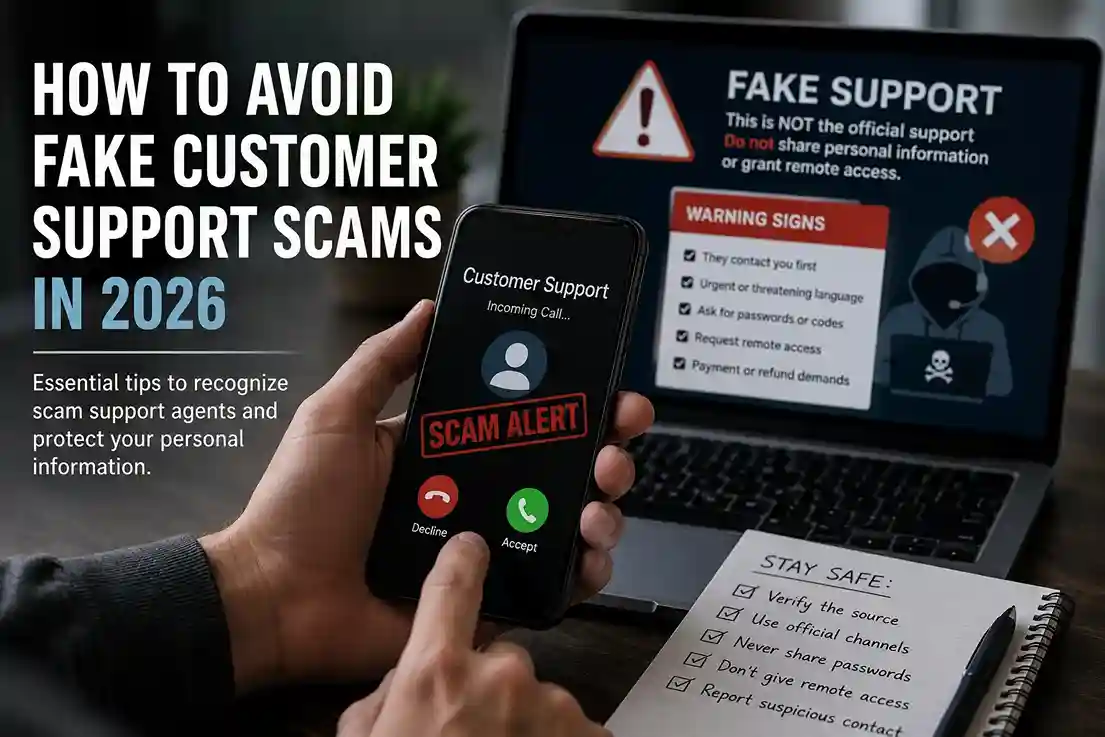
A classic scam pattern is the emergency message. It may say your account will be suspended, your device is infected, your subscription has expired, or your payment failed. The goal is not to inform you. The goal is to rush you.
The FTC and FBI both warn consumers about scams that rely on pressure, fear, and impersonation. Legitimate support teams do not usually demand immediate action through an unexpected message, especially not when they want passwords, one-time codes, remote access, or payment. (consumer.ftc.gov, fbi.gov)
A simple rule helps here: if the message creates panic, pause before you respond.
3. Never give remote access to a stranger
One of the most damaging fake customer support scams involves remote access software. The scammer may tell you to install a screen-sharing tool or a remote support app so they can “fix” the problem. Once access is granted, they can see private information, change settings, move money, or install malicious software.
This is where people often make a serious mistake. They assume the caller is real because the instructions sound technical. In reality, technical language is often part of the disguise. If you did not initiate the support session through a verified company channel, do not install remote access tools on request.
4. Search the company yourself, not the link they give you
Scammers commonly send fake support links that look nearly identical to the real company’s website. That is why the safest move is to ignore the link in the message and navigate manually to the official site. For example, if you need support for a banking or shopping issue, open the company’s bookmarked page yourself rather than clicking a help link in a text message.
That habit pairs well with How to Spot Fake Shopping Websites Before You Buy Anything in 2026, because fake support and fake storefronts often work together. A scammer may first create a fake purchase problem and then “help” you solve it.
5. Check the language and contact details carefully
A real support message may still be imperfect, but fake ones often reveal themselves through small inconsistencies. Look for odd grammar, mismatched branding, strange email addresses, broken links, unusual greetings, or a tone that feels copied and pasted.
Support scammers also like to hide behind generic labels such as “Customer Care,” “Technical Desk,” or “Help Team” without giving verifiable company details. If the message does not identify a real department or a traceable support path, treat it as suspicious.
6. Never share codes, passwords, or recovery details
No legitimate support agent should ask for your password, your one-time verification code, or your account recovery details through an unsolicited conversation. That is a major warning sign. The whole point of those codes is to prove that you are the rightful account owner. If someone else asks for them, that person may be trying to take over your account.
Google’s security guidance emphasizes that account protection depends on keeping credentials private and using strong verification methods. If a support request centers on “confirming” a code or resetting access in an unusual way, stop immediately. (safebrowsing.google.com)
7. Be suspicious of payment requests
Fake support scams sometimes end with a payment demand. The scammer may claim you need to pay a small fee to fix the issue, renew a license, unlock the account, or reverse damage. In some cases, they request gift cards, crypto, wire transfers, or direct payment details.
A legitimate support team usually does not demand payment in an odd format after an unexpected contact. If a “support” person pushes you toward a payment method that is difficult to reverse, step back and verify the issue independently. This is one reason How to Avoid Fake Customer Support Scams in 2026 should be read alongside broader safety content like How to Stay Safe on Public Wi-Fi in 2026, since unsafe networks and unsafe conversations often overlap.
8. Confirm with the official help center
If you are unsure, go directly to the company’s official help center. Use a saved bookmark or type the address yourself. Then compare the support contact method, ticket system, and phone number with the one in the message you received.
Many people ignore this step because they think they are saving time. In practice, those extra 30 seconds can prevent a costly mistake. Real support does not disappear when you verify it independently.
Common mistakes people make with support scams
One common mistake is believing that a professional logo or polished chat window proves legitimacy. Another is assuming a caller is real because they already know a few correct details about the account. Scammers often collect those details from previous leaks, social engineering, or public information.
A second mistake is staying in the conversation after the first warning sign. Once a scammer has your attention, they can keep the pressure going. The longer the conversation lasts, the more likely you are to comply. Readers who already follow How to Create a Family Online Safety Plan in 2026 often handle these situations better because they know who to ask before reacting.
A third mistake is trying to “test” the scammer by engaging too deeply. That can be risky if the scam includes malicious links, downloads, or remote tools. The safer choice is usually to stop, document the interaction, and report it.
Best practices that make support scams easier to catch
A few habits make a big difference:
- Use official apps and bookmarked support pages.
- Turn on two-factor authentication for important accounts.
- Keep your device and browser updated.
- Save the real customer support number for important services.
- Pause before responding to unexpected warnings.
- Verify urgent claims through a second channel.
- Avoid handing over screen control to strangers.
- Report suspicious messages through the official support or fraud channel.
These habits are simple, but they work because they slow down the scammer’s strongest weapon: urgency. The FBI advises consumers to stay alert for impersonation and fraud patterns, while the FTC recommends verifying unexpected requests and avoiding pressure-based decisions. (consumer.ftc.gov, fbi.gov)
What to do if you already interacted with a fake support scam
If you gave information to a fake support agent, act quickly. Change passwords for the affected account and any other accounts that used the same password. Turn on multifactor authentication. Check your email, bank, shopping, and messaging accounts for suspicious activity. If you gave remote access, disconnect the device and scan it using trusted security tools.
If a payment was made, contact your bank or payment provider immediately. If a recovery code or password was shared, assume the account may be compromised and secure it at once. The FTC advises people to act quickly after suspected scam exposure, and reporting the incident helps reduce further damage. (consumer.ftc.gov)
Why support scams are becoming harder to spot
Support scams in 2026 are more convincing because attackers understand behavior better than they used to. They know which apps people use, what kind of messages get opened, and how to make a problem sound urgent without sounding obviously fake. Some scams even mimic customer service chat flows so well that the only real clue is the request itself.
That is why practical awareness matters more than ever. If a message asks for private credentials, a verification code, or remote access, the safest answer is almost always no. That rule protects you whether the scam starts by email, phone, chat, or social media.
Conclusion
Learning how to avoid fake customer support scams in 2026 comes down to one principle: verify everything before you trust it. Do not treat urgency as proof, do not give remote access to strangers, and do not share passwords or verification codes with anyone who contacted you out of the blue. If you already follow the safety habits in How to Keep Your Personal Data Safe Online in 2026 and How to Check If a Website Is Safe Before Entering Personal Details in 2026, you already have the right mindset to spot fake support more quickly. The FTC, CISA, FBI, and Google all point in the same direction: slow down, verify through official channels, and never let pressure do the thinking for you. (consumer.ftc.gov, cisa.gov)
FAQ
How can I tell if customer support is fake?
Check whether the contact was expected, whether the message uses pressure, and whether the support channel matches the company’s official process. Unsolicited requests for passwords, codes, payment, or remote access are major red flags.
Is a real company ever allowed to ask for my password?
No legitimate support team should ask for your password in an unsolicited conversation. They may guide you through account recovery, but they should not demand your credentials.
What should I do if I gave a scammer remote access?
Disconnect the device, change important passwords, enable two-factor authentication, review accounts for suspicious activity, and seek professional help if needed.
Are phone calls more dangerous than emails?
Both can be dangerous. Scammers use whichever channel seems most believable. The key is to verify the caller or sender independently before acting.
What is the fastest way to protect myself from support scams?
Use official support channels only, never share one-time codes, and always verify urgent claims through a second source before taking action.

Shiva S writes about AI, cybersecurity, online safety, Google Discover, and digital trends. His focus is creating practical, easy-to-understand guides that help readers stay informed and safer online.